

Heads up before you start: the gear links further down are Amazon affiliate links. I researched and bought several different versions of this stuff with my own money before landing on the four I use. Those are the ones I’ve field tested in my own van and they work well for me. If you’d rather not use my links, search the same items and buy them however you want.
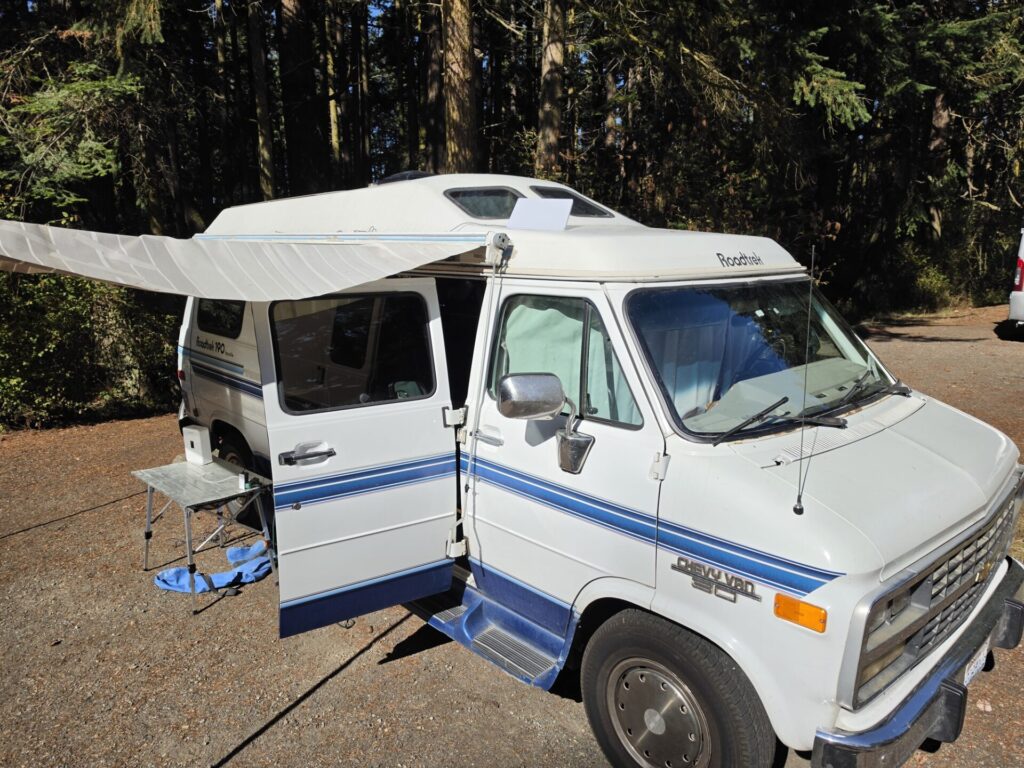
I’m at Fort Worden State Park in Port Townsend for a Roadtrek meetup. There are about 30 Roadtreks here, all different years. I’m in a 1995 Chevy 190 Versatile, site 74 in the lower area.
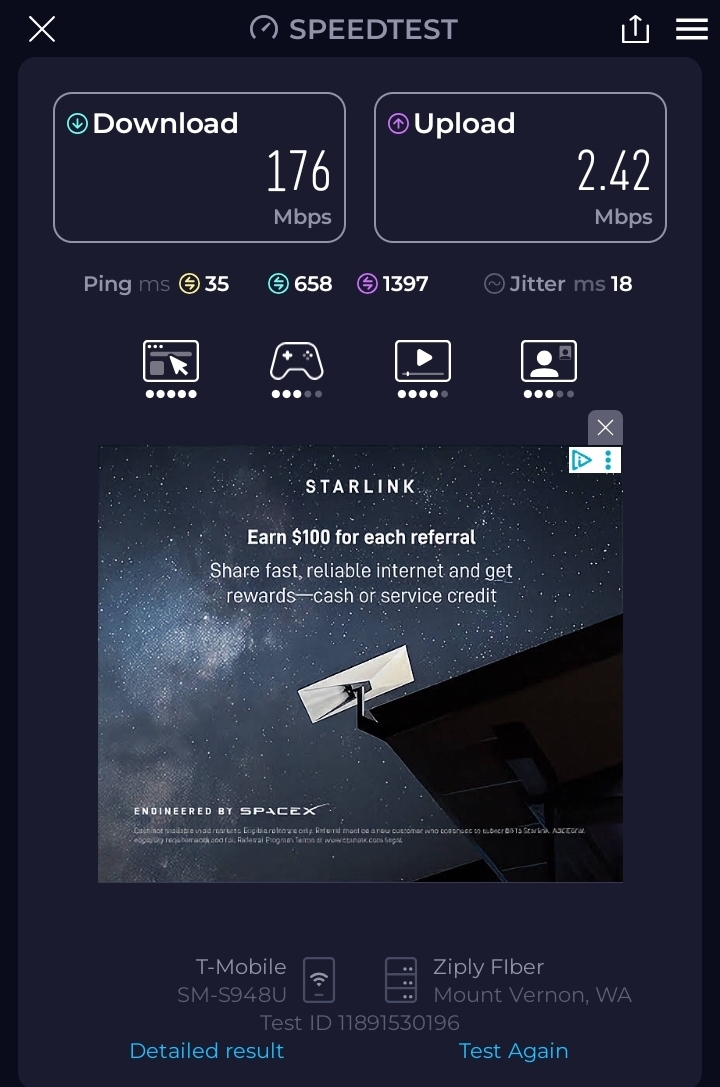
The T-Mobile signal here is a mixed bag. Download is fine. Upload is bad enough that it changes what you can do with the van. I ran a speed test on the phone and got 176 Mbps down and 2.42 Mbps up. That upload number is the one that matters if you want to send photos, back up video, or be on a call where anyone can see you. Loaded ping on that test was 658 ms down and 1397 ms up, with 18 ms jitter. A call on that connection would be a slideshow.
So I looked up at my campsite and almost left the Starlink Mini in its case.
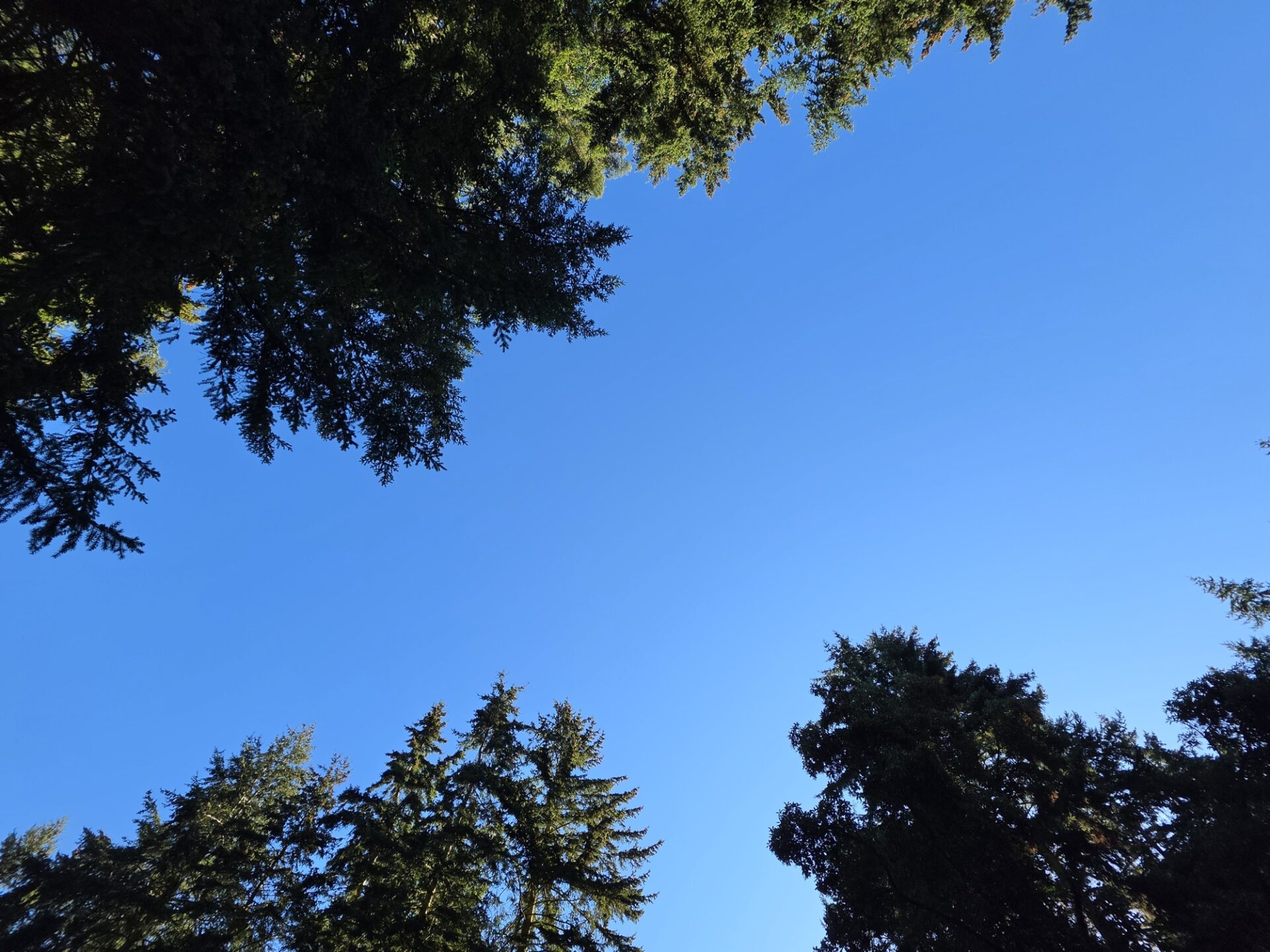
That’s the view straight up from my picnic table. Second-growth fir, and what sky I have is a ragged strip between branches. I’ve been doing this long enough to have an opinion about that, and my opinion was that it wasn’t going to work. Two years ago, under this much tree cover, the Mini would have been useless. Not slow. Unusable, the kind where a page loads halfway and then sits there.
I set it up anyway, because I’ve got a business renting these things and I’d rather find out than guess.
What actually happened
I set the Mini on the roof of the van around 7 PM. No mount, no pole, it’s just sitting up there on the roof. (It’s not pretty, but it works.)
When it first came up I was seeing around 95% ping success. That’s a real number in the Starlink app, and it’s the one I watch instead of speed. At 95% you can browse and read email and you’d barely notice. Get on a video call at 95% and people will ask if you’re still there. I didn’t think to screenshot that first hour, so you’ll have to take my word for the 95%. The morning numbers below are all from screenshots.
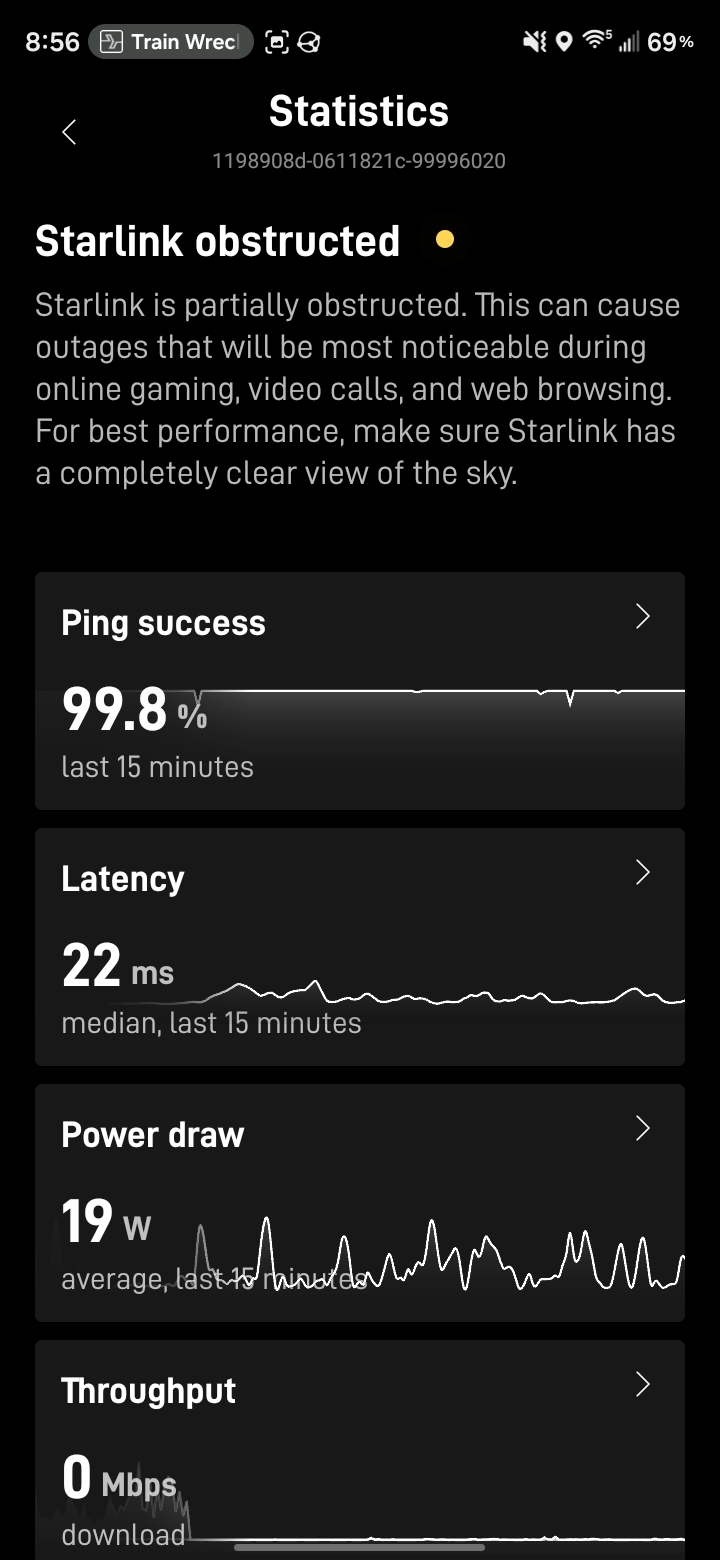
I left it running overnight and checked at 8 AM. It was at 99.8% over the previous 15 minutes, and it’s been bouncing between 99.8% and 100% since. Median latency 22 ms. I ran a speed test and got 156 Mbps down and 22.5 Mbps up, with 4 ms jitter, through the trees.
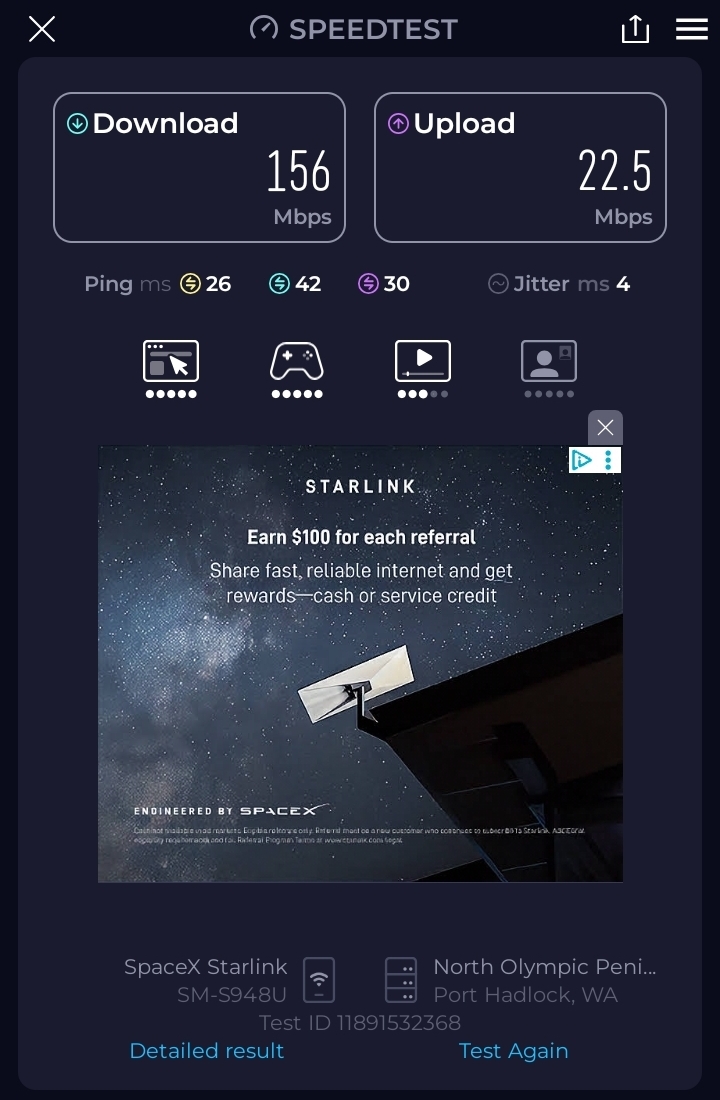
22.5 up versus 2.42 up. That’s the whole story of why I carry both.
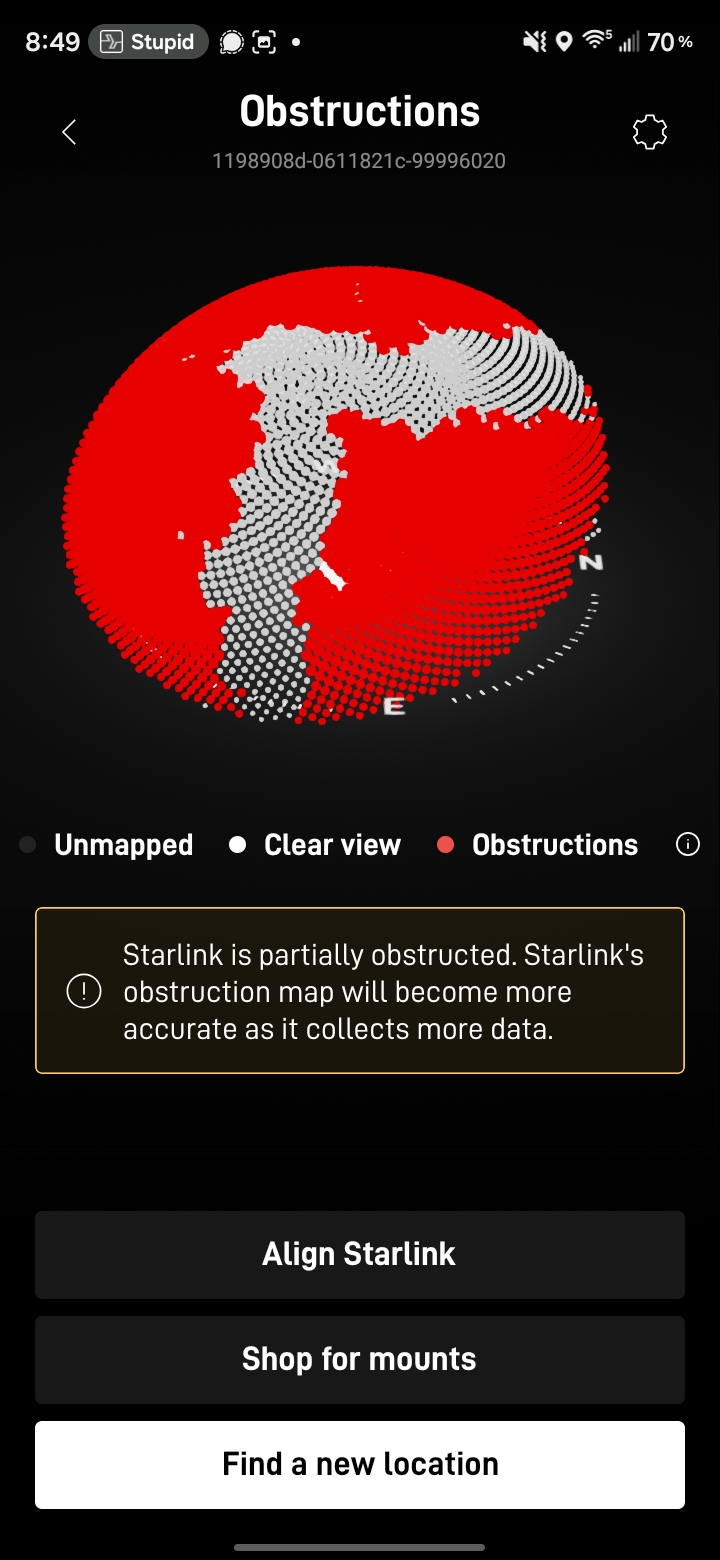
The obstruction map explains the overnight part. Pull it up in the app and mine is mostly red, with one white ribbon of clear sky running across it. Red is blocked. White is where the dish has confirmed it can actually see satellites. When you first plug in, the dish knows nothing and has to learn that map by watching signals come and go. It takes hours. What I saw between 7 PM and 8 AM was the map filling in.
The software change that made this possible
Last August, SpaceX published a piece about what they call beam switching. Their terminals now pick satellites both reactively and proactively, switching as often as 10 times a second. The reactive part handles a branch swinging in front of you: the link degrades, and the dish jumps to a different satellite in about a tenth of a second. The proactive part is the one that matters at a campsite. Once the terminal has an obstruction map, it knows a satellite is about to pass behind a tree, and it moves off that satellite before you lose anything.
That’s why my first hour was 95% and my second morning was 99.8%. The dish didn’t get a better view of the sky overnight. It got a better map of the view it already had.
The Mobile Internet Resource Center wrote a good piece on this last August that’s worth reading, and they make the caveat I’d make. If the center of your obstruction map is solid red, this doesn’t save you. There’s no satellite to switch to. My site has one clear ribbon and that turned out to be enough, but I’ve been in sites where it wouldn’t be, and no software fixes that.
There are just a lot more satellites now
The other half of this is that there’s more sky to work with than there used to be. In September 2024 there were about 6,370 active Starlink satellites in orbit. Right now the count is a little over 11,100. SpaceX passed 100 Falcon launches this year by August 22 and is on pace for roughly 160.
That’s most of a doubling in two years. More satellites means more of them visible from any given patch of open sky at any given moment, which is exactly what you need when your patch of open sky is a gap between two firs. The beam switching software is only useful if there’s somewhere to switch to.
I want to be careful here, because I didn’t run a controlled test. I don’t have a 2024 Mini sitting next to a 2026 Mini at this campsite with logs from both. What I have is two years of setting these up in bad spots and a clear memory of how badly it used to go. Take it as one guy’s experience and not a benchmark.
Power, since this is an RV post
The app says the Mini has been averaging 19W. Shore power here at Fort Worden, so I wasn’t watching amps this trip, but the math is the same either way. 19 watts times 24 hours is 456 watt hours a day. Divide by 12 volts and that’s 38 amp hours a day if you leave it on around the clock. Most of us don’t. Run it 8 hours and you’re at about 13 amp hours.
The four links below are the affiliate links I mentioned at the top. I own and use all four.
When I’m not on shore power I run the Mini one of two ways. There’s a cigarette lighter adapter made for the Starlink Mini, which is the simple answer if you have a 12V socket near where you want the router.
The other way is USB-C. The Mini will run off 20V USB-C PD with the right adapter and cable, and I use a 100W USB-C car charger to feed it.
What plan I’m on, and where the calculator comes in
I’m on Roam 100GB, which is $55 a month. There’s a 300GB tier at $80 if I need it, and I can move between them from the app. Above the cap you’re not cut off, you’re just moved to low-speed data for the rest of the cycle.
100GB sounds like a lot until you start streaming. That’s where the numbers get away from people, so I built a streaming calculator that takes your plan, your hours of watching, and what resolution you watch at, and tells you where you land. It’s free and there’s nothing to sign up for. It’s in the Tools menu on the site.
The short version is that resolution is the whole ballgame. 4K will eat a 100GB plan in a week of evenings. The same hours at 1080p will not. If you’re deciding between the $55 and the $80 plan, run your own numbers instead of guessing.
If you want to try one before you buy one
Hardware plus a monthly plan is real money to spend on a maybe, especially if your actual question is “will this work at my campsite.” That’s most of why we rent these. Rentals come with unlimited data, so you’re not watching a meter while you’re trying to find out whether the thing works in your trees. Rates by the day, week and month are on the rental page. Ships anywhere in the country in a Pelican case, or pick it up in south Seattle. You can add a Bluetti AC70 if you don’t have power sorted out yet.
We also do events, RV trips and camping, which are different problems. An event needs to cover a crowd. An RV needs to fit in a van and not kill the battery.
What I’d tell you to do at a treed site
Set it up anyway. That’s the real advice. I nearly didn’t, and I’d have spent the weekend on a 2.4 Mbps upload for no reason.
Then give it time before you judge it. The first hour is the worst it will ever be, because the dish hasn’t learned your site yet. Plug it in when you arrive, do something else, and look at ping success in the morning. If you’re above 99.5%, calls will work. Around 95%, browsing is fine and calls aren’t. Below about 90% I’d move the dish.
If you do move it, move it far. Six feet in the right direction can swap a solid branch for open sky, while six inches does nothing. Watch the obstruction map as you go and look for where the white is.
One thing I didn’t test: the campsites above mine are higher up and have more open sky, and I suspect T-Mobile is better up there. I’m not going to go find out today. I’ve got a working connection and about 30 Roadtreks to go look at.
I’ll be on a video call tonight. Based on 99.8% and 22 ms I expect it to be fine, but I haven’t done it yet, so I’m not going to tell you it was.
Thanks to the Roadtrek ’74-’03 Vintage & Classic Years group on Facebook, which is where I learned this meetup existed. If you have an older Roadtrek, that group knows more about your van than you do.